About us
Digital literacy isn't just knowing which buttons to press. It's understanding the system, navigating it with confidence, and helping others do the same. Digital skills should be empowering, ethical, and open to everyone.
This site has been built to counter what is being offered online to teach Microsoft Office skills. Most help sites don't explain everything particularly well, especially if you run into problems, video tutorials are too long, and paid lessons are too expensive. This site explains everything you need to know with no paywalls, no filler and no 'upgrade to unlock' traps.
Ctrl All is built by an open-source advocate who believes in clarity, confidence, and control. Whether you're new to Microsoft Office or an experienced user, this space is here to help you get unstuck or go one step further.
Get Started
Difficulty
In the menu for some articles you'll also have a choice of Beginner and Intermediate difficulty levels:
- If you're a beginner who's new to everything this site is set up for beginners by default.

If you are familiar with Office apps and understand some basic terminology, then switch to the Intermediate setting for more advanced content.

Note: Some topics are Intermediate level only as the content is too advanced for beginners. You'll see the Beginner option greyed out:

Language
Language on this site is optimised between US-English and non-US English. Use the toggle on the top bar if you want to switch between US and UK/CA/AU/NZ English. By default this will be based on your web browser settings.
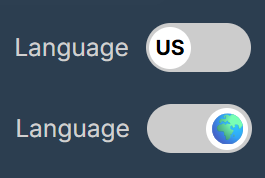
Note: The options and labels found in Microsoft Office remain in US English by default to reflect the programs accurately.
Let's go
- Browse a topic from the side menu. You can expand or collapse the side menu by clicking the toggle in the top left corner:

- Request a topic for an article
- Got a Tip? Share what you know.
Find us on social media


Network partner
Ctrl All is a proud network partner of Be Connected — an Australian Government initiative helping all Australians build confidence and skills online.

Copyright & Licensing
All content is © 2026 Ctrl All. Content licensed under CC BY-SA 4.0. Educational use is encouraged with attribution.

Privacy Policy
View our Privacy Policy.