Editing Charts
Firstly everything about inserting charts into Word, whether from within Word or from Excel into Word, is covered here: Inserting charts. Once you have a chart in Word here's how you can edit it:
Editing chart data in Word
To edit the data select the chart, go to the Chart Design and then click Edit data which will open up an Excel window to edit and save. Note below how the Excel window has a yellow banner message about the data being linked to the original Excel spreadsheet; saving here updates both files.
I updated my chart in Excel but it hasn't updated in Word
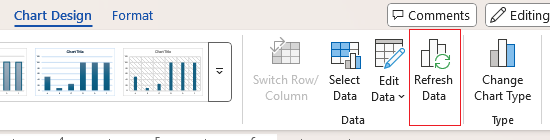
Linked Excel charts in Word only update automatically if both the Word document and Excel workbook are open during the edit. If the Word file was closed when you made changes in Excel, the chart won't reflect those updates. Instead you need to refresh it manually: select the chart in Word, go to Chart Design, and click Refresh Data. After a moment it'll update to match the data you have in Excel.
Found this useful? Share it with others.